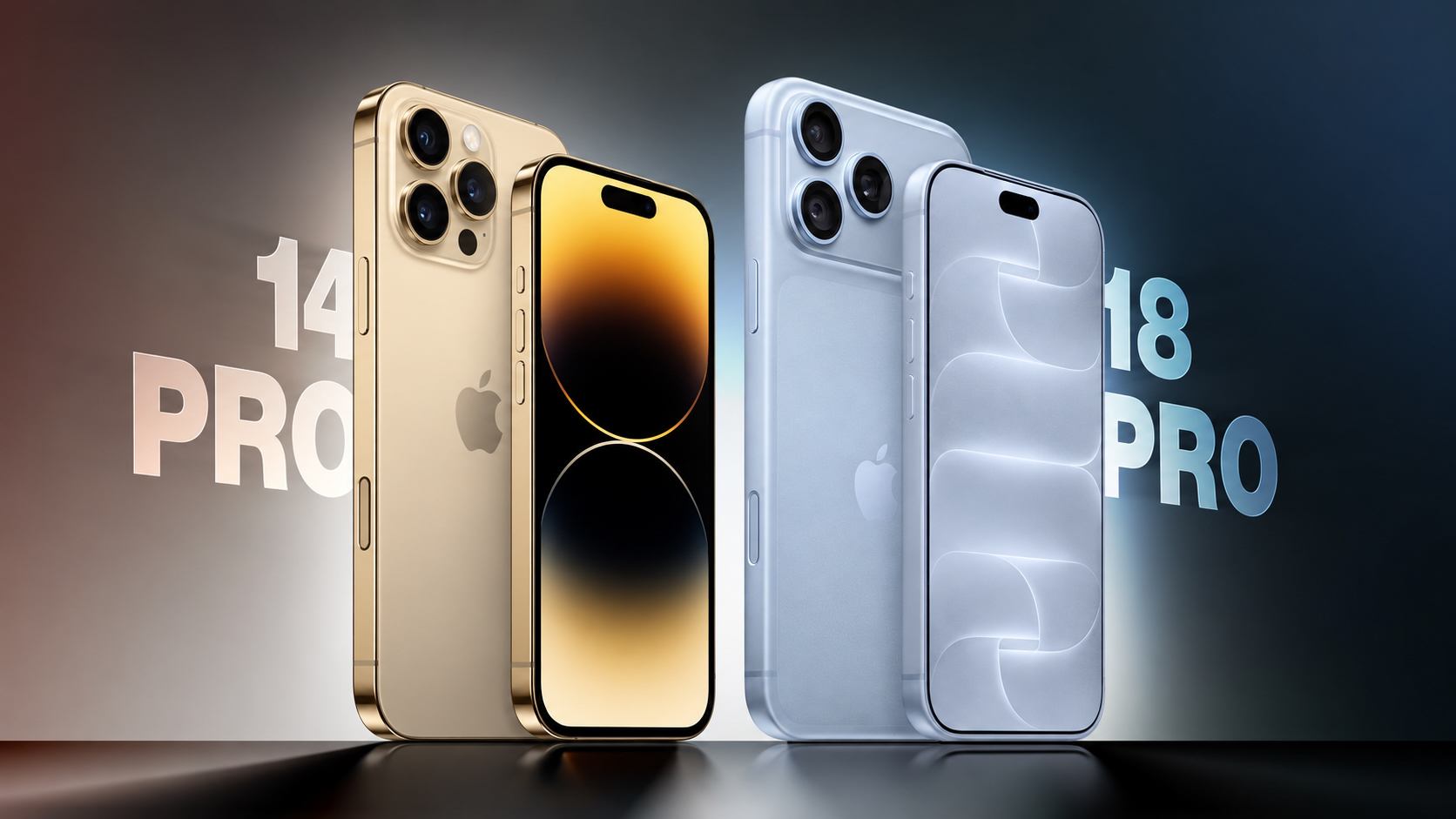
iPhone 14 Pro vs. iPhone 18 Pro Buyer's Guide: Should You Upgrade?
Apple announced the iPhone 18 Pro and iPhone 18 Pro Max earlier this month, arriving four years after the iPhone 14 Pro and iPhone 14 Pro Max. Four generations of changes make for a substantial upgrade, bringing larger displays, an all-new design, improvements to every camera, significantly longer battery life, faster charging, USB-C connectivity, and support for Apple Intelligence . The iPhone 15 Pro replaced the stainless steel frame with titanium, introduced the Action button and USB-C port, and added the A17 Pro chip. The iPhone 16 Pro introduced larger displays with thinner borders, the Camera Control, a 48-megapixel Ultra Wide camera, and improved video and audio recording. The iPhone 17 Pro replaced the titanium frame and glass back with an aluminum unibody, added vapor chamber cooling and Ceramic Shield 2, and upgraded both the telephoto and front-facing cameras. This year's refresh centers on the A20 Pro chip, a variable-aperture Main camera, a smaller Dynamic Island , and a further increase in battery capacity . For iPhone 14 Pro owners, all four sets of changes accumulate. The iPhone 18 Pro starts at $1,199 for 256GB, $200 more than the iPhone 14 Pro's $999 launch price, although the entry storage tier has doubled from 128GB. The iPhone 18 Pro Max starts at $1,299, also $200 more than the iPhone 14 Pro Max's $1,099 launch price, with the same increase in base storage. Here are the key differences between the iPhone 14 Pro and iPhone 18 Pro: Design and Display iPhone 14 Pro (2022) iPhone 18 Pro (2026) Stainless steel frame with squared-off edges and full glass back Aluminum unibody with partial Ceramic Shield back, improving heat dissipation Glass rounded square camera bump Full-width rounded rectangle aluminum camera plateau iPhone 14 Pro : 6.1-inch display iPhone 14 Pro Max : 6.7-inch display iPhone 18 Pro : 6.3-inch display iPhone 18 Pro Max : 6.9-inch display iPhone 14 Pro : 2,556-by-1,179-pixel resolution iPhone 14 Pro Max : 2,796-by-1,290-pixel resolution iPhone 18 Pro : 2,622-by-1,206-pixel resolution iPhone 18 Pro Max : 2,868-by-1,320-pixel resolution Wider borders around the display Thinner borders, with the initial reduction of 30% introduced on the iPhone 16 Pro Approximately 2-4 nits minimum display brightness 1 nit minimum display brightness More power-efficient display Ceramic Shield front Ceramic Shield 2 front, with 3x better scratch resistance than the iPhone 16 Pro Fingerprint-resistant oleophobic coating only Fingerprint-resistant oleophobic coating and Apple-designed anti-reflective coating to reduce glare 2,000 nits peak display brightness (outdoor) 3,000 nits peak display brightness (outdoor) Dynamic Island supports up to two simultaneous Live Activities Smaller Dynamic Island, supports up to three simultaneous Live Activities Ring/Silent switch Action button Camera Control capacitive button with sapphire crystal cover Available in Deep Purple, Gold, Silver, and Space Black Available in Silver, Black, Glacier, and Burgundy 95% fiber-based packaging 100% fiber-based packaging, suitable for recycling Dimensions and Weight iPhone 14 Pro (2022) iPhone 18 Pro (2026) Height iPhone 14 Pro : 147.5mm (5.81 inches) iPhone 14 Pro Max : 160.7mm (6.33 inches) iPhone 18 Pro : 150.0mm (5.91 inches) iPhone 18 Pro Max : 163.4mm (6.43 inches) Width iPhone 14 Pro : 71.5mm (2.81 inches) iPhone 14 Pro Max : 77.6mm (3.06 inches) iPhone 18 Pro : 71.9mm (2.83 inches) iPhone 18 Pro Max : 78.0mm (3.07 inches) Thickness 7.85mm (0.31 inches) 8.75mm (0.34 inches) Weight iPhone 14 Pro : 206 grams (7.27 ounces) iPhone 14 Pro Max : 240 grams (8.47 ounces) iPhone 18 Pro : 211 grams (7.44 ounces) iPhone 18 Pro Max : 249 grams (8.78 ounces) Chip, Performance, and Connectivity iPhone 14 Pro (2022) iPhone 18 Pro (2026) A16 Bionic chip A20 Pro chip Built with TSMC's N4P process (4nm) Built with TSMC's N2 process (2nm) 6-core CPU with 2 performance cores and 4 efficiency cores 6-core CPU with 2 super cores and 4 efficiency cores 6GB LPDDR5 RAM 12GB LPDDR5X RAM 51.2GB/s memory bandwidth 115GB/s memory bandwidth 5-core GPU 7-core GPU with Neural Accelerators Hardware-accelerated ray tracing 16-core Neural Engine Dual 16-core Neural Engine (32 total cores) Passive cooling Vapor chamber cooling with 3x more surface area than the iPhone 17 Pro New chip packaging that places silicon die beside memory, allowing it to attach directly to the vapor chamber Earlier video encoding hardware Enhanced video encoding hardware supporting higher-frame-rate recording and additional professional formats HEVC, H.264, and ProRes video playback HEVC, H.264, AV1, and ProRes video playback Supports iOS 27 , but not Apple Intelligence or Siri AI Supports iOS 27, Apple Intelligence, Siri AI, and Visual Intelligence Qualcomm Snapdragon X65 modem iPhone 18 Pro : Apple C2 modem in all countries iPhone 18 Pro Max : Apple C2 modem in all countries except the U.S., where it uses a Qualcomm modem Broadcom Wi-Fi and Bluetooth chip Apple N1 chip for Wi-Fi, Bluetooth, and Thread Wi-Fi 6 (802.11ax) Wi-Fi 7 (802.11be) Bluetooth 5.3 connectivity Bluetooth 6 connectivity First-generation Ultra Wideband chip Second-generation Ultra Wideband chip with Precision Finding for people Lightning port with USB 2 transfer speeds up to 480Mb/s USB-C port with USB 3 transfer speeds up to 10Gb/s Up to 1080p video output using a Lightning adapter DisplayPort support for up to 4K HDR video output Rear Camera iPhone 14 Pro (2022) iPhone 18 Pro (2026) First-generation quad-pixel sensor Newer sensor and computational imaging pipeline, building on the faster readout speeds and zero shutter lag introduced with the iPhone 16 Pro 12-megapixel HEIF and JPEG photos, or up to 48-megapixel ProRAW photos from the Main camera 24- and 48-megapixel super-high-resolution photos from the Main, Ultra Wide, and Telephoto cameras Fixed ƒ/1.78 aperture on the Main camera Variable aperture with four stops: ƒ/1.48, ƒ/1.8, ƒ/2.8, and ƒ/4.0, using six laser-cut blades API available for developers to control the aperture range within their own apps Night mode Faster Night mode, tied to the new variable-aperture lens Around 50% better Main camera low-light performance than the iPhone 16 Pro, with more detail in the back of group photos Pro controls in the Camera app: manual lens aperture, shutter speed, white balance, and histogram 12-megapixel Ultra Wide camera 48-megapixel Fusion Ultra Wide camera 12-megapixel Telephoto camera 48-megapixel Fusion Telephoto camera 3x Telephoto camera, with 77mm focal length 4x Telephoto camera, with 100mm focal length, also enabling 12-megapixel optical-quality 8x shots at 200mm 0.5x, 1x, 2x, and 3x zoom options, with optical-quality 2x derived from the Main camera 0.5x, 1x, 2x, 4x, and 8x zoom options, with optical-quality 2x and 8x derived from the Main and Telephoto cameras Digital zoom up to 15x Digital zoom up to 40x 24mm default Main camera lens Customizable default lens for the Fusion Main camera Macro photography 48-megapixel macro photography JPEG-XL compression for ProRAW photos Smart HDR 4 Smart HDR 5 Portrait mode with Depth Control Next-generation portraits with Focus and Depth Control First-generation Photographic Styles Photographic Styles 3, with tone, color, texture, and grain controls Depth mapping for AR and portrait photography Enhanced depth mapping for AR and portrait photography, with more accurate background and subject separation and more realistic bokeh Smart focus tracking Spatial photo capture Apple Reference Image (Main camera only) Camera Control The iPhone 14 Pro has a traditional Ring/Silent switch and lacks both of the dedicated controls Apple added to later generations. The iPhone 18 Pro includes an Action button that can launch the camera or Visual Intelligence, as well as a Camera Control with the following additional functions: Press Camera Control to launch the Camera app Press to capture a photo or press and hold to record video Light press to lock focus and exposure before reframing Slide across the capacitive surface to adjust settings such as zoom, exposure, styles, and tone Light-press controls overlay for quick access to camera settings Integration with supported third-party camera apps Press and hold to activate Visual Intelligence Video Recording iPhone 14 Pro (2022) iPhone 18 Pro (2026) 4K video recording at 24 fps, 25 fps, 30 fps, or 60 fps, with Dolby Vision HDR up to 60 fps 4K Dolby Vision video recording at 24 fps, 25 fps, 30 fps, 60 fps, 100 fps (Fusion Main), or 120 fps (Fusion Main) 1080p HD video recording at 25 fps, 30 fps, or 60 fps 1080p Dolby Vision video recording at 25 fps, 30 fps, 60 fps, or 120 fps (Fusion Main) ProRes video recording up to 4K at 30 fps, or 1080p at 30 fps on the 128GB model ProRes video recording up to 4K at 120 fps with external recording Records video to internal storage Can record video directly to external storage over USB-C Slo-mo video support for 1080p at 120 fps or 240 fps Slo-mo video support for 1080p up to 240 fps and 4K Dolby Vision up to 120 fps (Fusion Main) Cinematic mode recording up to 4K HDR at 30 fps Cinematic mode recording up to 4K Dolby Vision at 60 fps Cinematic mode effects can be applied after capture to Fusion Main video shot at up to 60 fps Pro controls for lens aperture, shutter speed, white balance, and histogram Smart focus tracking Improved low-light video at 1080p Action mode up to 2.8K at 60 fps Action mode up to 2.8K Dolby Vision at 60 fps Spatial video recording at 1080p at 30 fps Time-lapse video recording with stabilization Time-lapse video recording with stabilization, up to 4K Dolby Vision QuickTake video QuickTake video up to 4K Dolby Vision at 60 fps Apple Log 2 Academy Color Encoding System support ProRes RAW capture support Genlock support Dual Capture up to 4K Dolby Vision at 30 fps Front Camera iPhone 14 Pro (2022) iPhone 18 Pro (2026) 12-megapixel TrueDepth camera with conventional rectangular sensor 18-megapixel Center Stage camera with square sensor and TrueDepth technology Tap to zoom and rotate, allowing portrait and landscape framing without rotating the iPhone Center Stage for photos and video calls Ultra-stabilized video Dual Capture, recording the front and rear cameras simultaneously at up to 4K Dolby Vision at 30 fps Smart HDR 4 Smart HDR 5 Portrait mode with Depth Control Next-generation portraits with Focus and Depth Control First-generation Photographic Styles Photographic Styles 3, with tone, color, texture, and grain controls Smart focus tracking Pro controls for shutter speed, white balance, and histogram 4K video recording at 24 fps, 25 fps, 30 fps, or 60 fps, with Dolby Vision HDR up to 60 fps 4K Dolby Vision video recording at 24 fps, 25 fps, 30 fps, or 60 fps 1080p HD video recording at 25 fps, 30 fps, or 60 fps 1080p Dolby Vision video recording at 25 fps, 30 fps, or 60 fps ProRes video recording up to 4K at 30 fps, or 1080p at 30 fps on the 128GB model ProRes video recording up to 4K at 60 fps with external recording Cinematic mode up to 4K HDR at 30 fps Cinematic mode up to 4K Dolby Vision at 30 fps Cinematic mode effects can be applied after capture Improved low-light video at 1080p Time-lapse video recording with stabilization Time-lapse video recording with stabilization, up to 4K Dolby Vision QuickTake video QuickTake video up to 4K at 60 fps in Dolby Vision Apple Log 2 Academy Color Encoding System support ProRes RAW capture support Audio Recording iPhone 14 Pro (2022) iPhone 18 Pro (2026) Stereo recording Spatial Audio and stereo recording Studio-quality four-mic array Wind noise reduction Audio Mix with algorithms for higher-quality voices and the ability to isolate music Battery and Charging iPhone 14 Pro (2022) iPhone 18 Pro (2026) iPhone 14 Pro : 3,200 mAh battery iPhone 14 Pro Max : 4,323 mAh battery iPhone 18 Pro : 4,056 mAh battery (SIM-tray models); 4,288 mAh battery (eSIM-only models) iPhone 18 Pro Max : 5,391 mAh battery (SIM-tray models); 5,567 mAh battery (eSIM-only models) iPhone 14 Pro : Up to 23 hours of video playback iPhone 14 Pro Max : Up to 29 hours of video playback iPhone 18 Pro : Up to 36 hours of video playback iPhone 18 Pro Max : Up to 45 hours of video playback iPhone 14 Pro : Up to 20 hours of streamed video playback iPhone 14 Pro Max : Up to 25 hours of streamed video playback iPhone 18 Pro : Up to 33 hours of streamed video playback iPhone 18 Pro Max : Up to 40 hours of streamed video playback Up to 50% charge in around 30 minutes with a 20W adapter or higher Up to 50% charge in around 15 minutes with a 60W-capable adapter or higher MagSafe wireless charging up to 15W with a 20W adapter or higher MagSafe wireless charging up to 25W, reaching 50% charge in 30 minutes with a 35W adapter or higher Qi wireless charging up to 7.5W Qi2 wireless charging up to 25W Optimized Battery Charging Charge Limit from 80% to 100% in 5% increments, plus Optimized Battery Charging Battery Health shows maximum capacity, peak performance capability, and whether service is recommended Battery Health also shows cycle count, manufacture date, and date of first use Battery designed to retain 80% of its original capacity at 500 complete charge cycles Battery designed to retain 80% of its original capacity at 1,000 complete charge cycles Storage and Pricing iPhone 14 Pro (2022) iPhone 18 Pro (2026) Available with 128GB, 256GB, 512GB, or 1TB storage Available with 256GB, 512GB, 1TB, or 2TB storage iPhone 14 Pro : Launched at $999 (128GB), $1,099 (256GB), $1,299 (512GB), $1,499 (1TB) iPhone 14 Pro Max : Launched at $1,099 (128GB), $1,199 (256GB), $1,399 (512GB), $1,599 (1TB) iPhone 18 Pro : $1,199 (256GB), $1,399 (512GB), $1,799 (1TB), $2,399 (2TB) iPhone 18 Pro Max : $1,299 (256GB), $1,499 (512GB), $1,899 (1TB), $2,499 (2TB) Now discontinued Sold directly by Apple Current purchase prices depend on third-party stock, condition, and warranty iPhone 18 Pro : From $49.95 a month for 24 months via Apple Upgrade iPhone 18 Pro Max : From $54.12 a month for 24 months via Apple Upgrade For iPhone 14 Pro and iPhone 14 Pro Max owners considering a new device, the iPhone 18 Pro is a worthwhile upgrade. Four generations of changes bring improvements to the display, every camera on the device, battery life, charging, sustained performance, and connectivity. Battery life is likely to be the strongest improvement for most users, particularly if their current device no longer comfortably lasts through the day, while faster wired charging makes brief charging stops more useful. The newer battery is also designed to retain 80% of its original capacity for twice as many complete charge cycles under ideal conditions, and Charge Limit offers more control over long-term battery wear. USB-C is another significant quality-of-life improvement for iPhone 14 Pro owners. It allows the iPhone to share cables with recent Macs, iPads, and accessories, while the jump from USB 2 to USB 3 speeds makes large wired photo and video transfers far quicker. The Action button and Camera Control also provide two new physical controls that the iPhone 14 Pro lacks. The camera upgrade is especially compelling for anyone who regularly takes photos or records video. Higher-resolution Ultra Wide and Telephoto cameras expand the options beyond the Main camera, while the variable aperture and Pro controls provide additional creative flexibility. Both iPhone 14 Pro sizes move from a 3x Telephoto camera to 4x, alongside an optical-quality 8x option that substantially extends their usable reach. For video creators, the accumulated changes are more consequential still. Higher-frame-rate 4K recording, external recording over USB-C, ProRes RAW, Genlock, Apple Log 2, Dual Capture, and improved audio tools expand the range of work that can be completed on the device. Spatial photo and video capture is also useful for Apple Vision Pro owners. The square front-camera sensor makes landscape framing easier without rotating the phone, while Center Stage improves flexibility for group photos and video calls. The A20 Pro and vapor chamber cooling make the strongest performance case for users who play demanding games, record long video clips, or regularly push their device through sustained workloads. The increase from 6GB to 12GB of RAM and the additional AI processing hardware also enable Apple Intelligence, Siri AI, and Visual Intelligence, none of which are available on the iPhone 14 Pro. The older model still supports iOS 27 and remains capable for messaging, browsing, photography, and other everyday activities, so the latest software update does not make it obsolete. There are physical trade-offs to consider. Both newer models are taller and thicker, although the move from stainless steel to aluminum means the weight increases by only 5 grams on the Pro and 9 grams on the Pro Max despite the larger displays and batteries. The aluminum enclosure improves thermal management, but it is less premium-looking, and it may show dents and scratches more readily than the iPhone 14 Pro's stainless steel frame. If your iPhone 14 Pro still meets your needs and comfortably lasts through the day, upgrading is not urgent, but you may want to think about getting a new device soon. A battery replacement may be worth considering if reduced health is your main complaint and you would otherwise be happy to keep your device. The upgrade becomes much easier to recommend when battery limitations coincide with a desire for Apple Intelligence, USB-C, the newer cameras, and a larger display. A discounted iPhone 17 Pro is another option if your priorities are the aluminum design, higher-resolution telephoto camera, square front-camera sensor, Apple Intelligence, USB-C, and vapor chamber cooling. Those upgrades arrived before this year's model. Paying more for the iPhone 18 Pro makes the clearest sense when you also want the variable aperture, Pro controls, A20 Pro, smaller Dynamic Island, and further improvements to battery life and charging, but coming from an iPhone 14 Pro, the iPhone 17 Pro will still feel like a significant upgrade. Related Roundup: iPhone 18 Pro Buyer's Guide: iPhone 18 Pro (Buy Now) Related Forum: iPhone This article, " iPhone 14 Pro vs. iPhone 18 Pro Buyer's Guide: Should You Upgrade? " first appeared on MacRumors.com Discuss this article in our forums
 MacRumors•Hartley Charlton21 Sept