Siripage 2

Product · 36 articles
Share

Coverage, page 2

page 2 of 2

Apple Releases watchOS 27 With Siri AI, New Watch Face, Smart Stack Improvements and More

Apple today released watchOS 27 , the newest version of the operating system that runs on the Apple Watch. ‌watchOS 27‌ is compatible with the Apple Watch Series 9 and later, the Apple Watch Ultra 2 and later, and the Apple Watch SE 3 . ‌watchOS 27‌ can be downloaded for free on a compatible device through the Settings app on the watch. The update introduces support for Siri AI, a more capable version of ‌Siri‌ that uses personal context and onscreen awareness to help you get things done. There's a new ‌Siri‌ Modular watch face, updates to Smart Stack, improvements to Liquid Glass, and a consolidated Find My app. Apple's release notes for the update are below. Siri AI - A more capable and conversational version of Siri is rolling out to users. It helps you find what you need and get more done, drawing on capabilities like personal context understanding, app actions, onscreen awareness, and access to broad world knowledge - New voice experience offers more expressive and natural-sounding voices, and lets you customize expressivity and pace to make Siri more personal to you using powerful on-device models on paired iPhone Air and iPhone 17 Pro models and later - Dedicated Siri app provides an easy way to revisit an existing conversation or kick off a new one, and privately syncs conversations across your Apple products with iCloud Apple Intelligence across apps - Workout Buddy delivers motivation with new insights and is now available without your iPhone nearby when you have a Wi-Fi or cellular connection - Call Context in the Phone app understands when you're speaking to certain businesses and proactively surfaces relevant information from across your apps, like a confirmation code or a reservation number Cycle Tracking - Cycle deviation notifications that are suggestive of perimenopause can be received by those age 40 and over Watch Faces - Siri Modular face features a rectangular complication that mirrors the top widget of the Smart Stack, which dynamically updates to show the most relevant widget, as well as a Siri complication to quickly invoke Siri Smart Stack - Single-handed tap gesture enables you to tap your index finger and thumb together once to select a widget in the Smart Stack, even if your other hand is occupied - New suggestion widgets will be surfaced when most relevant to you, including a Parked Car location, birthday reminders for a close contact, balance changes on a transit card, Noise app after a loud noise notification, and more System Improvements - Dynamic app grid highlights your most popular and recently used apps - Find My app is now consolidated into one app to show People, Devices, and Items with a map-centric interface - Media playback now starts faster - Workout app makes distance calculations during treadmill workouts even more accurate from the first step of every walk or run - Fitness app features more accurate route maps after workouts - Battery extension notifications may be proactively offered to disable certain features to increase battery life, including gestures, Start Workout reminders, and Raise to Speak method of invoking Siri - Shazam in the Smart Stack and Music Recognition app identifies songs offline without an internet connection and delivers results automatically when you're back online - Liquid Glass refinements improve readability with more uniform refraction and improved contrast Siri AI in ‌watchOS 27‌ requires an Apple Intelligence-capable iPhone, which includes the iPhone 15 Pro models, the iPhone Air , and all iPhone 16 , iPhone 17 , and iPhone 18 models. Related Roundups: watchOS 26 , watchOS 27 Tag: Siri Related Forum: Apple Watch This article, " Apple Releases watchOS 27 With Siri AI, New Watch Face, Smart Stack Improvements and More " first appeared on MacRumors.com Discuss this article in our forums

MacRumorsMacRumorsJuli Clover14 Sept

Apple Releases visionOS 27 With Siri AI and New Spatial Experiences

Apple today released visionOS 27, the newest version of the visionOS operating system that runs on the Apple Vision Pro . It is a free update available on both versions of the Vision Pro headset. visionOS 27 can be downloaded by opening the Settings app, selecting the General section, and choosing Software Update. Installing the update requires the headset to be removed, and a progress bar appears EyeSight display. visionOS 27 adds support for Siri AI, a smarter version of ‌Siri‌ that can access your personal information and do more in and between apps. ‌Siri‌ supports Visual Intelligence for asking questions about objects on your screen or in your physical environment. The update adds a new spatial scene feature for panoramic photos, a Thórsmörk Environment, and immersive Safari environments on supported websites. Apple's release notes for visionOS 27 are below. Siri AI (Apple Vision Pro with M2 and later) - A more capable and conversational version of Siri is rolling out to users. It helps you find what you need and get more done, drawing on capabilities like personal context understanding, app actions, onscreen awareness, and access to broad world knowledge - Place Siri anywhere in your space and it stays pinned there, ready to help - Look and speak to Siri without saying "Hey Siri". Just look at Siri and start speaking - Dedicated Siri app provides an easy way to revisit an existing conversation or kick off a new one, and privately syncs conversations across your Apple products with iCloud - Visual Intelligence lets you ask Siri about physical objects in your room or content on your screen, just by looking at them - Write with Siri enables you to generate a draft from scratch, edit what you've written, or get feedback from Siri virtually anywhere you type - New voice experience offers more expressive voices, and lets you customize expressivity and pace to make Siri more personal to you using powerful on-device models on Apple Vision Pro (M5) Apple Intelligence across apps (Apple Vision Pro with M2 and later) Safari - Organize by Topic uses Apple Intelligence to automatically group your Bookmarks and Reading List by topic, so related pages are easier to find Image Playground - All-new Image Playground uses a new generative model to create high-quality images in virtually any style, including photorealistic, and lets you modify images using natural language Home - Summarized activity notifications combine related alerts across accessories into a single notification - Video descriptions for HomeKit Secure Video recordings summarize what's happening in a clip for eligible iCloud+ subscribers - Camera clip search lets you find specific moments from your HomeKit Secure Video cameras by searching in the Home app Spatial Experiences - Spatial scene panoramas transforms your panoramas into spatial scenes with depth and dimension - Personal Environments allows you to choose a panorama special to you and set it as your own Environment - Windows with curvature help you view content more comfortably in apps including Safari, Freeform, and Apple TV using Multiview - Spatial Preview with supported macOS apps lets you pull 3D models directly from Mac Virtual Display into your space to preview and edit at true scale, with changes reflected in real time - Quick Look enhancements let you visualize changes to 3D models in your space. Change materials, choose wireframes or UV maps, or add annotations - New Environment: Thórsmörk transforms your space into Iceland with two variations: a serene daytime river view and a dramatic night scene with aurora - Freeform spatial groups let you pull multiple items off your board and arrange them in your space, view objects together as a group, and organize boards into collaborative folders - Web environments in Safari render fully immersive 360° backgrounds that surround your physical space System Improvements - Faster Wi-Fi connection enables Apple Vision Pro to connect to Wi-Fi up to 3x faster after powering on - Look to see notifications lets you glance at a notification to expand it, and tap and hold to take action like replying to a message without opening the app - Improved Control Center shows notifications, playback controls, and Environments controls organized into three distinct areas for easier access - High quality recording gives you the ability to capture your unfoveated view in 4K, with full edge-to-edge sharpness for up to 3 minutes - Mirror in high resolution lets you check what you're actively recording on a different device or monitor in 4K - Messages syncing more quickly and reliably updates unread counts and notifications across your devices - New extra small widgets let you customize your space with your favorite apps - Mac Virtual Display widget connects to your Mac with a tap and can be placed anywhere in your space Accessibility - Look to Drive enables you to control a compatible powered wheelchair with your eyes by sending a movement command from Apple Vision Pro to a connected wheelchair accessory - Updated Dwell Control offers a new way to make selections using just your eyes by glancing at a selection marker above the dwell pointer to confirm instantly, instead of waiting for timer The customizable ‌Siri‌ voice requires the M5 Vision Pro, but all other features are available on both models. More information on visionOS 27 is available in our Vision Pro roundup . Related Roundup: Apple Vision Pro Tag: Siri Buyer's Guide: Vision Pro (Neutral) Related Forum: Apple Vision Pro This article, " Apple Releases visionOS 27 With Siri AI and New Spatial Experiences " first appeared on MacRumors.com Discuss this article in our forums

MacRumorsMacRumorsJuli Clover14 Sept

Apple's Siri AI Can Be Swapped Out for Claude, ChatGPT, Code Shows

Code sleuth "pdfu" has uncovered iOS 27 and macOS Golden Gate private frameworks that show Apple has designed its new Siri architecture to work with third-party AI models at what appears to be a surprisingly deep level. One mechanism called Model Delegation allows Claude to appear as a Siri extension in the same way as the existing built-in ChatGPT extension. In pdf's video, shared on X , the macOS user brings up the "Search or Ask" bar and chooses Claude as the AI model via an "Ask..." contextual menu. After enabling the Claude extension, the user asks Siri to "Ask Claude" to set a reminder in Apple's Reminders app. Claude then interprets the natural language reminder request and Siri subsequently creates the reminder. The implication is that if the request requires access to an Apple system feature, Claude hands the task back to Siri. In another example, Claude can be seen in a Siri app conversation window receiving a request to create a CSV file – something Siri itself cannot handle – and successfully returning the result. What's more intriguing is the second protocol demonstrated in the video that appears to go considerably further, and could really open up the AI landscape for Apple software requests. An inference provider in "Model Manager Services" apparently allows Apple's own server-side Siri model to be completely replaced by another model, such as GPT-5.6. In this scenario, ChatGPT receives Apple's Siri planner prompt and tool definitions, which enables it to request system actions, receive the resulting personal data, and formulate an answer that Siri presents using its own interface and voice. And here's an app extension replacing Siri AI's server model with GPT-5.6 Terra. It uses the Inference Providing protocol in Model Manager Services. GPT-5.6 receives Apple's native Siri planner prompt and tool definitions. It can make tool calls that perform system actions, and... pic.twitter.com/cz88kyq3io — pdfu (@itspdfu) September 13, 2026 In the demonstration video, the user asks the ChatGPT model (within the Siri app) to find emails about a specific topic, summarize their contents and action points, then send an message to a person in the user's contacts via the Messages app. The response is then shown as logged in OpenAI's platform web interface. The European Union's Digital Markets Act may have helped shape Apple's approach here, as it requires Apple to give third parties effective access to iOS hardware and software features available to Apple's own services, and the European Commission has specifically said this principle extends to Siri. The "Ask..." implementation is currently limited to the ChatGPT extension in the macOS 27 Golden Gate Release Candidate (which is effectively the final version of the software set to be released later today), so Claude is not yet available. Meanwhile, Apple has not yet opened up the model delegation entitlement to third parties and it isn't front-facing to users, but it at least shows how extensively Apple has engineered Siri for future model interoperability. Related Roundups: iOS 27 , iPadOS 27 , macOS Golden Gate Tags: ChatGPT , Claude , Siri , Siri AI Related Forums: iOS 27 , macOS Golden Gate This article, " Apple's Siri AI Can Be Swapped Out for Claude, ChatGPT, Code Shows " first appeared on MacRumors.com Discuss this article in our forums
MacRumorsMacRumorsTim Hardwick14 Sept

iOS 27 Available Today With These 8 New Features

During its iPhone 18 Pro and iPhone Duo event last week, Apple announced that iOS 27 will be released widely on Monday, September 14. iOS 27 should be available around 10 a.m. Pacific Time / 1 p.m. Eastern Time today via the Settings app, under General → Software Update. Below, we have highlighted eight new features and changes coming with iOS 27, with the main attraction being a major revamp of Siri. iOS 27 is compatible with the iPhone 11 series and newer, but Siri AI and other Apple Intelligence features are limited to the iPhone 15 Pro and newer. New Features Siri AI The classic version of Siri has always been useful for basic actions like setting a timer and checking the weather, but it has notoriously struggled with more advanced requests over the years. That all changes with iOS 27, which features a much more intelligent and personalized version of Siri named Siri AI. Siri AI is essentially a ChatGPT-like version of Siri that can answer pretty much anything. iOS 27 introduces a dedicated Siri app, or you can continue to invoke the assistant by pressing and holding the iPhone's side button. Given it is powered by Apple Intelligence, Siri AI requires an iPhone 15 Pro or newer. Siri AI can draw on your personal information stored on your iPhone, has on-screen awareness, and can perform actions in more apps that support it. Apple said Siri AI is limited to English to start, and the feature will be subject to daily usage limits, with expanded access to be available for a fee in the future. Siri AI will not be initially available in the EU on iOS 27, iPadOS 27, and watchOS 27, as Apple is in a regulatory battle with the European Commission. More Apple Intelligence Features Other new Apple Intelligence features on iOS 27 include new "Extend" and "Reframe" options in the Photos app, the ability to generate "photorealistic" images in the Image Playground app, the ability to create new shortcuts in the Shortcuts app by simply describing them, generated video descriptions for HomeKit Secure Video cameras, and more. Liquid Glass Design Changes Apple introduced a new Liquid Glass design on iOS 26, and it has further refined the interface on iOS 27. Apple says Liquid Glass now has "more uniform refraction and improved contrast," and app icons are "sharper and more detailed." A new slider lets you adjust how clear or tinted Liquid Glass looks. Performance Improvements iOS 27 makes a lot of actions and experiences faster across the operating system. For example, Apple said app launches are up to 30% faster, new photos in the Photos app library load up to 70% faster, and AirDrop transfers are up to 80% faster. To learn about others, check out our list of noteworthy performance improvements . iPhone Handoff Apple has added a new iPhone Handoff feature to iOS 27 that allows you to switch between two iPhones while using the same phone number on each device. iPhone Handoff requires support from carriers, which may charge a fee for the feature. T-Mobile in the U.S. and Deutsche Telekom in Germany will be the first carriers to offer iPhone Handoff, with T-Mobile set to charge $5 per month for it. Apple said Verizon and the UK's EE plan to offer the feature by the end of the year, with more carriers to follow. To learn more, read our iPhone Handoff explainer and Apple's support document . In addition, a video demonstrating the feature was shared in our forums . Apple Cash Bill Splitting In the U.S. only, iOS 27 allows you to split bills with a new feature powered by Apple Cash and Apple Intelligence. This capability is available in the Apple Wallet and Messages apps, or by using the new Siri mode in the Camera app. "When users point their iPhone at a receipt using Siri mode, it can surface the relevant action to split a bill with Apple Cash and identify the items on the receipt," said Apple. "As users select their items, their total payment is calculated, including their share of tax and tip, so they can pay back exactly what they owe with Apple Cash." Hide Location in Find My In the Find My app, you can now share your location with others for a custom duration , such as four days and six hours. Or, you can set a set an exact date and time for your location sharing to expire. In addition, you can now pause your location sharing with specific people until the end of the day, without them knowing. The ability to hide your location is meant for things like planning a surprise birthday party for your spouse. On iOS 26 and earlier, there are only three preset timeframes available for Find My location sharing: indefinitely, until end of day, and one hour. CarPlay Video Apps Back at WWDC 2025, Apple revealed that it was planning to allow CarPlay users to watch video via AirPlay in their vehicles while they are not driving. In a WWDC 2026 video aimed at developers, Apple said the CarPlay video feature is available in new vehicles that support it. When playing a video in an iPhone app that supports AirPlay video streaming, users can select the car's display from the AirPlay menu on iOS and watch the video on a compatible vehicle's screen. New in iOS 27, Apple is allowing developers to create CarPlay apps with video browsing capabilities, so you can find videos to watch right on CarPlay. This feature can keep you entertained while you are not driving. For example, Apple said you may use it while waiting in your car at the airport, or charging your electric vehicle. For safety reasons, video playback is only enabled when the vehicle is parked. CarPlay video will likely roll out in new vehicles over time, so stay tuned. Compatible iPhones The following iPhone models are compatible with iOS 27: iPhone 18 Pro iPhone 18 Pro Max iPhone Duo iPhone 17e iPhone 17 iPhone 17 Pro iPhone 17 Pro Max iPhone Air iPhone 16e iPhone 16 iPhone 16 Plus iPhone 16 Pro iPhone 16 Pro Max iPhone 15 iPhone 15 Plus iPhone 15 Pro iPhone 15 Pro Max iPhone 14 iPhone 14 Plus iPhone 14 Pro iPhone 14 Pro Max iPhone 13 iPhone 13 mini iPhone 13 Pro iPhone 13 Pro Max iPhone 12 iPhone 12 mini iPhone 12 Pro iPhone 12 Pro Max iPhone 11 iPhone 11 Pro iPhone 11 Pro Max iPhone SE (2nd generation and later) More In June, Apple shared a list of more than 250 new features and changes across iOS 27, iPadOS 27, macOS 27, watchOS 27, tvOS 27, and visionOS 27. All of the updates will be released today. Related Roundups: iOS 27 , iPadOS 27 Related Forum: iOS 27 This article, " iOS 27 Available Today With These 8 New Features " first appeared on MacRumors.com Discuss this article in our forums
MacRumorsMacRumorsJoe Rossignol14 Sept

iOS 27 Available Tomorrow With These 8 New Features

During its iPhone 18 Pro and iPhone Duo event last week, Apple announced that iOS 27 will be released widely on Monday, September 14. iOS 27 should be available around 10 a.m. Pacific Time / 1 p.m. Eastern Time tomorrow via the Settings app, under General → Software Update. Below, we have highlighted 12 new features and changes coming with iOS 27, with the main attraction being a major revamp of Siri. iOS 27 is compatible with the iPhone 11 series and newer, but Siri AI and other Apple Intelligence features are limited to the iPhone 15 Pro and newer. New Features Siri AI The classic version of Siri has always been useful for basic actions like setting a timer and checking the weather, but it has notoriously struggled with more advanced requests over the years. That all changes with iOS 27, which features a much more intelligent and personalized version of Siri named Siri AI. Siri AI is essentially a ChatGPT-like version of Siri that can answer pretty much anything. iOS 27 introduces a dedicated Siri app, or you can continue to invoke the assistant by pressing and holding the iPhone's side button. Given it is powered by Apple Intelligence, Siri AI requires an iPhone 15 Pro or newer. Siri AI can draw on your personal information stored on your iPhone, has on-screen awareness, and can perform actions in more apps that support it. Apple said Siri AI is limited to English to start, and the feature will be subject to daily usage limits, with expanded access to be available for a fee in the future. Siri AI will not be initially available in the EU on iOS 27, iPadOS 27, and watchOS 27, as Apple is in a regulatory battle with the European Commission. More Apple Intelligence Features Other new Apple Intelligence features on iOS 27 include new "Extend" and "Reframe" options in the Photos app, the ability to generate "photorealistic" images in the Image Playground app, the ability to create new shortcuts in the Shortcuts app by simply describing them, generated video descriptions for HomeKit Secure Video cameras, and more. Liquid Glass Design Changes Apple introduced a new Liquid Glass design on iOS 26, and it has further refined the interface on iOS 27. Apple says Liquid Glass now has "more uniform refraction and improved contrast," and app icons are "sharper and more detailed." A new slider lets you adjust how clear or tinted Liquid Glass looks. Performance Improvements iOS 27 makes a lot of actions and experiences faster across the operating system. For example, Apple said app launches are up to 30% faster, new photos in the Photos app library load up to 70% faster, and AirDrop transfers are up to 80% faster. To learn about others, check out our list of noteworthy performance improvements . iPhone Handoff Apple has added a new iPhone Handoff feature to iOS 27 that allows you to switch between two iPhones while using the same phone number on each device. iPhone Handoff requires support from carriers, which may charge a fee for the feature. T-Mobile in the U.S. and Deutsche Telekom in Germany will be the first carriers to offer iPhone Handoff, with T-Mobile set to charge $5 per month for it. Apple said Verizon and the UK's EE plan to offer the feature by the end of the year, with more carriers to follow. To learn more, read our iPhone Handoff explainer and Apple's support document . In addition, a video demonstrating the feature was shared in our forums . Apple Cash Bill Splitting In the U.S. only, iOS 27 allows you to split bills with a new feature powered by Apple Cash and Apple Intelligence. This capability is available in the Apple Wallet and Messages apps, or by using the new Siri mode in the Camera app. "When users point their iPhone at a receipt using Siri mode, it can surface the relevant action to split a bill with Apple Cash and identify the items on the receipt," said Apple. "As users select their items, their total payment is calculated, including their share of tax and tip, so they can pay back exactly what they owe with Apple Cash." Hide Location in Find My In the Find My app, you can now share your location with others for a custom duration , such as four days and six hours. Or, you can set a set an exact date and time for your location sharing to expire. In addition, you can now pause your location sharing with specific people until the end of the day, without them knowing. The ability to hide your location is meant for things like planning a surprise birthday party for your spouse. On iOS 26 and earlier, there are only three preset timeframes available for Find My location sharing: indefinitely, until end of day, and one hour. CarPlay Video Apps Back at WWDC 2025, Apple revealed that it was planning to allow CarPlay users to watch video via AirPlay in their vehicles while they are not driving. In a WWDC 2026 video aimed at developers, Apple said the CarPlay video feature is available in new vehicles that support it. When playing a video in an iPhone app that supports AirPlay video streaming, users can select the car's display from the AirPlay menu on iOS and watch the video on a compatible vehicle's screen. New in iOS 27, Apple is allowing developers to create CarPlay apps with video browsing capabilities, so you can find videos to watch right on CarPlay. This feature can keep you entertained while you are not driving. For example, Apple said you may use it while waiting in your car at the airport, or charging your electric vehicle. For safety reasons, video playback is only enabled when the vehicle is parked. CarPlay video will likely roll out in new vehicles over time, so stay tuned. Compatible iPhones The following iPhone models are compatible with iOS 27: iPhone 18 Pro iPhone 18 Pro Max iPhone Duo iPhone 17e iPhone 17 iPhone 17 Pro iPhone 17 Pro Max iPhone Air iPhone 16e iPhone 16 iPhone 16 Plus iPhone 16 Pro iPhone 16 Pro Max iPhone 15 iPhone 15 Plus iPhone 15 Pro iPhone 15 Pro Max iPhone 14 iPhone 14 Plus iPhone 14 Pro iPhone 14 Pro Max iPhone 13 iPhone 13 mini iPhone 13 Pro iPhone 13 Pro Max iPhone 12 iPhone 12 mini iPhone 12 Pro iPhone 12 Pro Max iPhone 11 iPhone 11 Pro iPhone 11 Pro Max iPhone SE (2nd generation and later) More In June, Apple shared a list of more than 250 new features and changes across iOS 27, iPadOS 27, macOS 27, watchOS 27, tvOS 27, and visionOS 27. All of the updates will be released on Monday, September 14. Related Roundups: iOS 27 , iPadOS 27 Related Forum: iOS 27 This article, " iOS 27 Available Tomorrow With These 8 New Features " first appeared on MacRumors.com Discuss this article in our forums
MacRumorsMacRumorsJoe Rossignol13 Sept

You Can't Use Apple Watch's Live Rewind Secretly, Apple Says

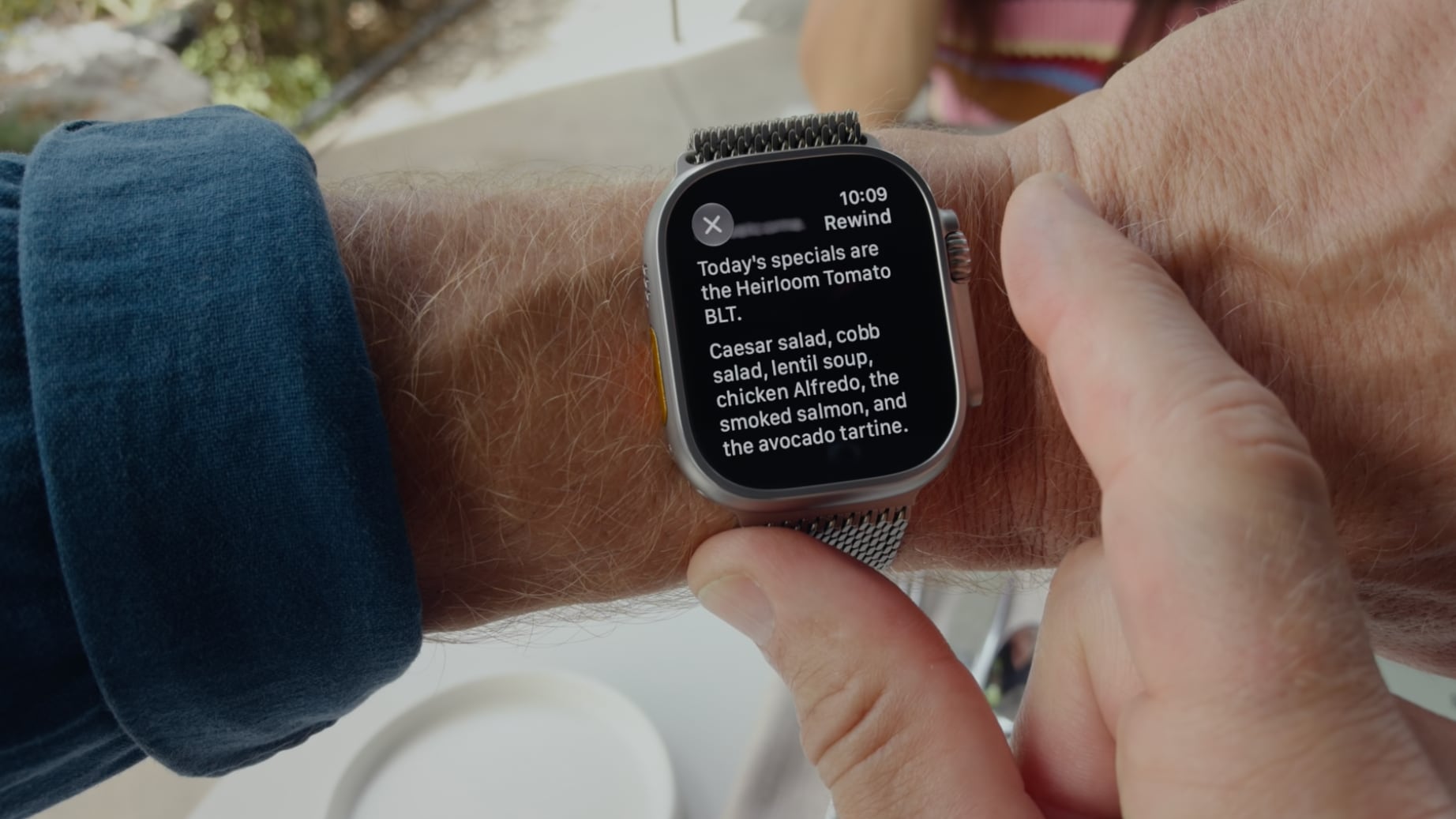
With the Apple Watch Series 12 and Ultra 4, Apple is adding Live Rewind, which relies on an S11 processor and new continual listening features. Live Rewind listens to what's happening around the wearer, and when activated with a double press on the Digital Crown, offers a transcript of what was said in the last 15 seconds. Apple says the feature will let users catch something they missed or are less familiar with. Snippets can be referred to Siri for further evaluation or saved to the ‌Siri‌ app. Apple users are already expressing privacy concerns about Live Rewind, and likening it to Meta 's much-maligned smart glasses, but no Apple Watch user will be able to activate it surreptitiously. When the Digital Crown is pressed for Live Rewind, the Apple Watch will sound an audible chime from the speaker. The chime will sound even if the Apple Watch is on silent or if headphones are connected. At the same time, a full-display animation and microphone indicator will appear, with the combination meant to alert those nearby that the feature has been activated. Apple says Live Rewind only activates with a deliberate press on the Digital Crown and all processing is done on-device. It shows the last 15 seconds of speech as a text snippet on the display, and does not continue to transcribe in the background. It can be turned on or off through the Watch app on the iPhone. The Apple Watch Series 12 and Ultra 4 have an S11 chip equipped with a Secure Exclave. Apple describes the Secure Exclave as a hardware-isolated compartment that processes sensor data separately from the rest of the system. Data processed and analyzed in the Secure Exclave is not accessible by the operating system, apps, the user, or Apple. Live Rewind and other Audio Intelligence features do not generate audio recordings. Audio flows into the Secure Exclave, is processed, and then deleted. According to Apple, Live Rewind text snippets "disappear permanently" from the Apple Watch approximately 30 seconds after the Apple Watch display dims, unless the info is saved to the ‌Siri‌ app. Live Rewind requires an Apple Watch Series 12 or Apple Watch Ultra 4 paired with an iPhone 16 or later, though the iPhone 16e is not compatible. Apple Intelligence and ‌Siri‌ AI are required, and the feature is not available for users under 13. The feature will launch later this year and won't be in the initial versions of watchOS 27 and iOS 27 . Related Roundup: Apple Watch 12 Buyer's Guide: Apple Watch (Buy Now) Related Forum: Apple Watch This article, " You Can't Use Apple Watch's Live Rewind Secretly, Apple Says " first appeared on MacRumors.com

MacRumorsMacRumorsJuli Clover10 Sept